


It has been a productive first quarter for the team here at Public-i, with a number of practical improvements to both Connect and HybridLink for Teams. Here’s a run–down of what we’ve been working on, along with a look at what is coming next.
HybridLink for Teams
More precise control over voting rights
We have introduced improved voting settings within HybridLink for Teams, giving operators the ability to assign bespoke voting permissions to individual remote attendees.
Only those who are pre-approved can participate in a vote. Guest speakers, visiting officers, and other non-voting participants can be excluded quickly and clearly. Operators can simply select which remote attendees are eligible, making the process straightforward and controlled.

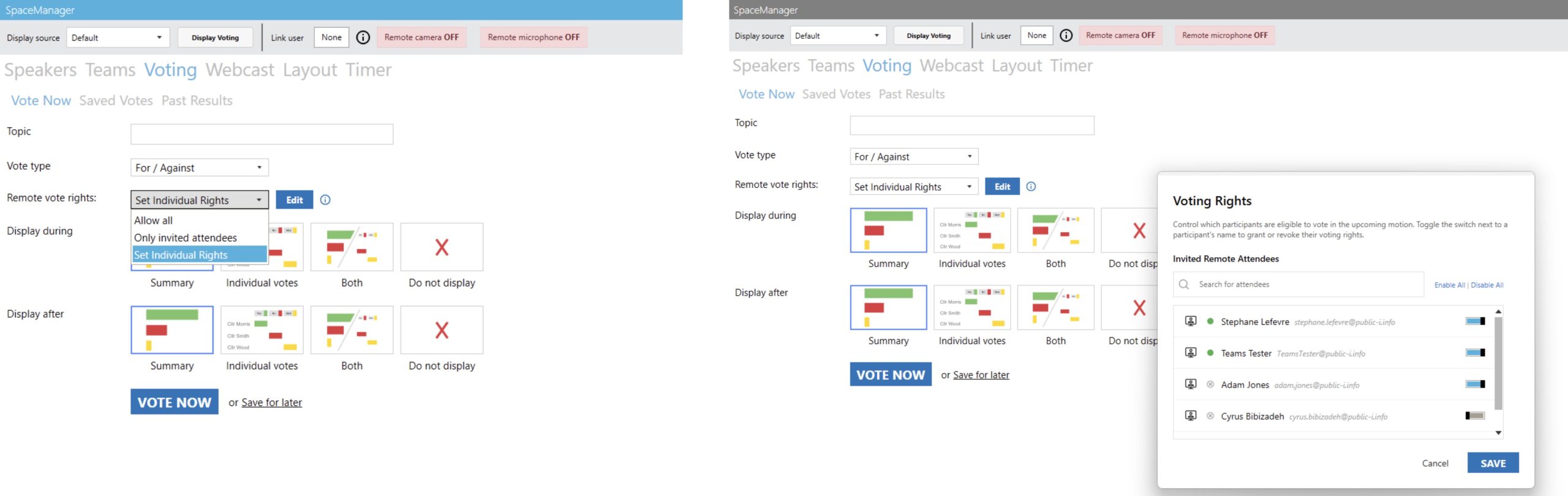
Setting voting rights in HybridLink for Teams
This change removes the need for the previous “not eligible to vote” option within the voting interface. Voting eligibility no longer relies on users excluding themselves, ensuring greater accuracy and clearer instructions for attendees.
Vote results
It is now possible for individual users to see results when a vote stops in Teams. Users can see these results on their own device and can filter by ‘vote cast’ or by participant name. This means participants can see who voted and how. Of course, these results are also shown in the room and can be exported by officers after the meeting.

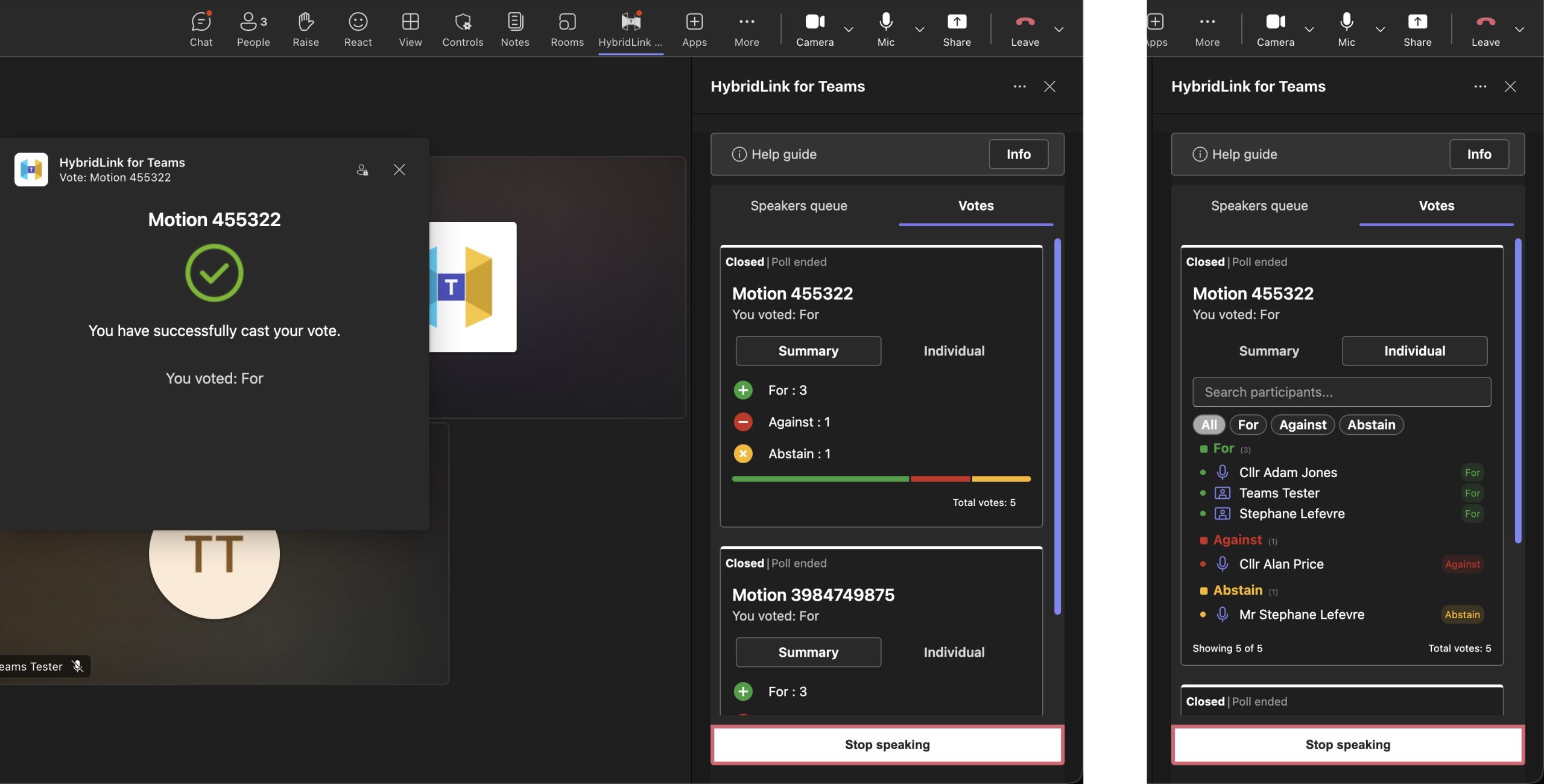
Automatic hybrid vote results received in Teams, with filters for individual votes
Connect Webcaster
Party affiliation data
Thanks to upgraded integration with mod.gov and CMIS, users can now choose to automatically print speaker party details onto the webcast, alongside speaker names. Whenever a speaker presses their microphone to talk, this data is pulled directly and displayed. For users of Bosch Dicentis or Televic Cocon conference systems, the process for importing mod.gov/CMIS profiles is even easier now than ever before. Check our last update for details.


Lower thirds with automatic speaker name and party
What’s in development?
Our focus remains on improving clarity, automation, and accessibility across both Connect and HybridLink for Teams.
Connect
Automatic YouTube event creation
Integration with YouTube and mod.gov is underway to allow users to automatically create YouTube live events. This will simplify workflows and reduce manual setup time.
AI-powered transcript tools
We are introducing AI options within transcripts, including automated summarisation. This will help users quickly extract key points from meetings and improve accessibility of recorded content.
HybridLink for Teams
Seven option voting for Scottish councils
We are working on enabling amendment style voting with up to seven choices (motion, amendment 1, amendment 2, etc.., and abstain) which will allow Scottish clients to hold hybrid votes which align with established in-room voting practices. Initially, this will be compatible with certain Televic conference systems only.
Agenda integration within hybrid meetings
Agenda points will soon be brought directly into Hybrid meetings. This means in-room signage and Microsoft Teams will both reflect the current agenda item.
As always, these updates are shaped by feedback from our users and partners. We are planning a couple of user groups this year – one in the North West and one in the South (likely London). More updates will follow soon but if you want to find out more, please do get in touch.